Greetings,
Here is an OSC patch you can use to MUTE audio signals per each Polypulse Tracks using PlugData.
PlugData is a Free OSC application and (in my case) is the more stable OSC soft I’ve tested under my OS (Windows 11).
Principle:
First you need to configure your OSC ethernet connection between Polypulse “setting menu” and your computer as explained in the Polypulse OSC documentation here : Open Sound Control - PolyPulse manual
Once ethernet connection configuration set, you can use the patch.
OSC stream is broadcasted everywhere in the network, so you have to filter it at the input of each channel :
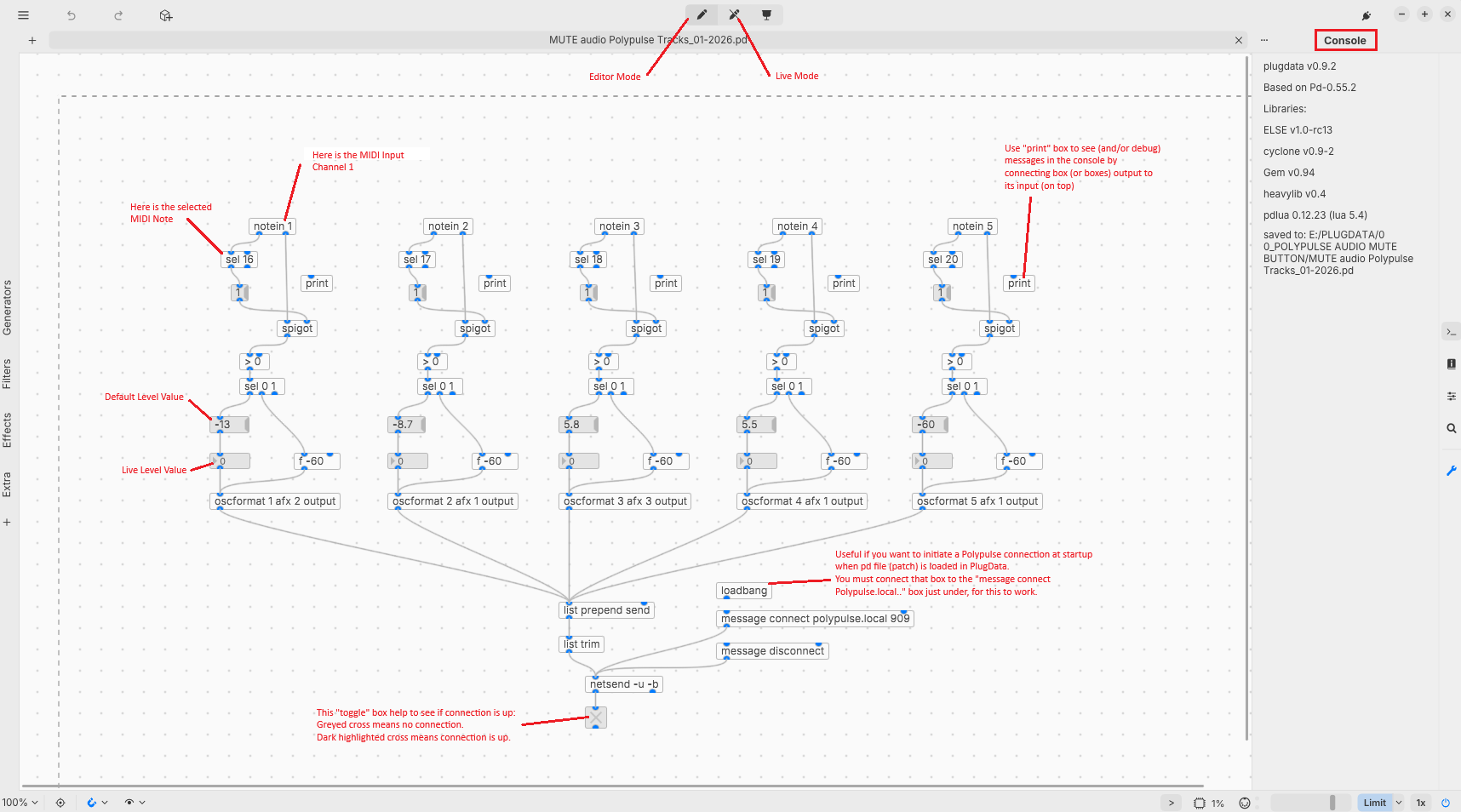
Each Polypulse track has its own editable dedicated MIDI channel and Note In to separate OSC stream by voice (see in snapshot).
Workflow is “MIDI Note in (Button on your MIDI controller) → logic press/release → OSC volume → MUTE “Stereo” audio FX in Polypulse”.
This patch is configurated for Polypulse “Stereo” audio FX, but can be used and modified for any other OSC automation needs.
They are other ways (logics) to obtain the same result (MUTE audio) using PlugData. But in my case I prefered that one.
Why ?:
The need to mute audio signal without impacting the Polypulse sequencer.
With OSC you can automate lots of Polypulse parameters, and with this patch you can use your MIDI controller to MUTE ouput audio like with an audio console.
It works great with MIDI controller able to set MIDI button in “toggle mode” (ex: Behringer X-Touch Mini or else).
How to use ?:
As you’ve set you audio level in the Polypulse “Stereo” FX, you can add/set those “default” level values in the “msg” box patch, using Plugdata Editor mode (see in snapshot).
The goal here is to come back to those exact same values if you activate a MUTE, cause after a MUTE level comes back to whatever value set in the “msg” box.
After that step, you can also use the “nbx” box just under the “msg” box to edit Polypulse “Stereo” audio FX level in real time (live) using PlugData Live Mode.
The “nbx” don’t conseve the value you set live after you close the patch (pd) file in PlugData.
So if you find out that level set during live session using PlugData best fit your need, then you can update the “default” value in the “msg” box.
For the Mute level it is set to -60dB by default, but in Polypulse 'Stereo" audio FX it will read -48dB.
And for information, in PlugData, boxes inputs are on the top of the boxes and outputs at the bottom.
Summary:
This patch is done to help performing an audio MUTE using Polypulse in live context.
For more explaination about using PlugData you have its own relative documentation, and there video tutorials on Youtube.
I used ChatGPT to optimize the patch logic.
You can use that patch and optimize it as you want.
Peace out !
Link to download the patch (.pd file): "OSC_Audio MUTE for Polypulse" (MUTE audio Polypulse Tracks_01-2026.pd) is available for download
Download link is available only for 7 days. I’ll reupload it if necessary.